
History of C language
C language has evolved from three different structured language ALGOL, BCPL and B Language. It uses many concepts from these languages while introduced many new concepts such as datatypes, struct, pointer etc. In 1988, the language was formalised by American National Standard Institute(ANSI). In 1990, a version of C language was approved by the International Standard Organisation(ISO) and that version of C is also referred to as C89.
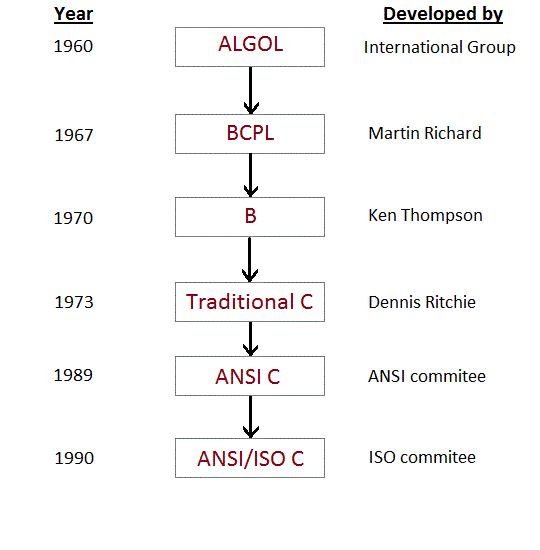
The idea behind creating C language was to create an easy language which requires a simple compiler and enables programmers to efficiently interact with the machine/system, just like machine instructions.
C language compiler converts the readable C language program into machine instruction.
Why C Language is so popular?
C language is a very good language to introduce yourself to the programming world, as it is a simple procedural language which is capable of doing wonders.
Programs written in C language takes very less time to execute and almost executes at the speed of assembly language instructions.
Initially C language was mainly used for writing system level programs, like designing operating systems, but there are other applications as well which can be very well designed and developed using C language, like Text Editors, Compilers, Network Drivers etc.
Latest Version of C
The current latest version of C language is C11, which was introduced in 2011. It is supported by all the standard C language compilers.
Many new features have been introduced in this version and an overall attempt to improve compatibility of the C language with C++ language has been made. We will learn about the C11 edition, once we are done with learning C language, towards the end of this tutorial series.
Features of C language
- It is a robust language with rich set of built-in functions and operators that can be used to write any complex program.
- The C compiler combines the capabilities of an assembly language with features of a high-level language.
- Programs Written in C are efficient and fast. This is due to its variety of data type and powerful operators.
- It is many time faster than BASIC.
- C is highly portable this means that programs once written can be run on another machines with little or no modification.
- Another important feature of C program, is its ability to extend itself.
- A C program is basically a collection of functions that are supported by C library. We can also create our own function and add it to C library.
- C language is the most widely used language in operating systems and embedded system development today.
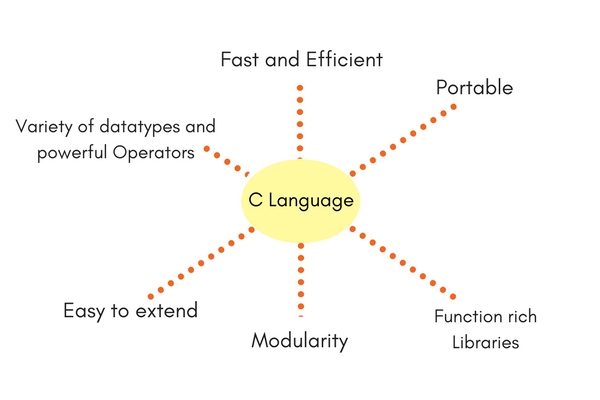
C Language is an amazing language when it comes to simplicity of syntax with decent functionality. It is a perfect mix of both, which makes it the best contender to be taught to students who have just started learning coding, to introduce them into a programming world.
algorithms-
Algorithm is the step by step process of solving of problem.
Syntax-
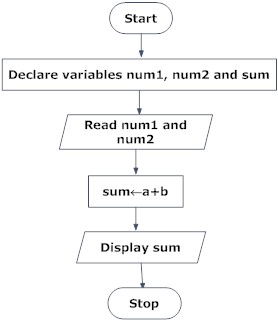
Step 1: Start
Step 2: Declare variables num1, num2 and sum.
Step 3: Read values num1 and num2.
Step 4: Add num1 and num2 and assign the result to sum. sum←num1+num2
Step 5: Display sum
Step 6: Stop
FLOWCHARTS-
It is the graphically representation of Algorithms
Syntax-
flowchart to add two numbers entered by user.
life cycle of c program-
Design and Code
Involves designing a program to meet a specified requirement, and creating the programming language text files that will comprise the program source.
Compile
After checking for syntactical correctness, converts the programming language source files into machine readable instructions, where C variables are associated with memory addresses, and C statements are turned into a series of machine language instructions. The compiler can produces various forms of output, depending on the compiler options selected.
Linkage Editor
Links compiler output with external modules requested by the compiled program. C programs can use routines from C libraries or any object or archive file from the IBM XL family of languages. C programs can also use modules produced by the current or previous compilations. As well as linking the external modules, the linkage editor resolves addresses within the object module.
Run and Test
This stage can be both the final step in program development, or it can be an intermediate point in the program design and implementation process. A program’s design commonly is further refined as a result of information gathered during testing.
What are Keywords in C?
Keywords are preserved words that have special meaning in C language. The meaning of C language keywords has already been described to the C compiler. These meaning cannot be changed. Thus, keywords cannot be used as variable names because that would try to change the existing meaning of the keyword, which is not allowed.(Don’t worry if you do not know what variables are, you will soon understand.) There are total 32 keywords in C language.
| auto | double | int | struct |
| break | else | long | switch |
| case | enum | register | typedef |
| const | extern | return | union |
| char | float | short | unsigned |
| continue | for | signed | volatile |
| default | goto | sizeof | void |
| do | if | static | while |
What are Identifiers?
In C language identifiers are the names given to variables, constants, functions and user-define data. These identifier are defined against a set of rules.
Rules for an Identifier
- An Identifier can only have alphanumeric characters(a-z , A-Z , 0-9) and underscore(
_). - The first character of an identifier can only contain alphabet(a-z , A-Z) or underscore (
_). - Identifiers are also case sensitive in C. For example name and Name are two different identifiers in C.
- Keywords are not allowed to be used as Identifiers.
- No special characters, such as semicolon, period, whitespaces, slash or comma are permitted to be used in or as Identifier.
When we declare a variable or any function in C language program, to use it we must provide a name to it, which identified it throughout the program, for example:
int myvariable = "Studytonight";
Here myvariable is the name or identifier for the variable which stores the value “Studytonight” in it.
Character set
In C language characters are grouped into the following catagories,
- Letters(all alphabets a to z & A to Z).
- Digits (all digits 0 to 9).
- Special characters, ( such as colon
:, semicolon;, period., underscore_, ampersand&etc). - White spaces
Difference between Variable and Identifier?
An Identifier is a name given to any variable, function, structure, pointer or any other entity in a programming language. While a variable, as we have just learned in this tutorial is a named memory location to store data which is used in the program.
| Identifier | Variable |
|---|---|
| Identifier is the name given to a variable, function etc. | While, variable is used to name a memory location which stores data. |
| An identifier can be a variable, but not all indentifiers are variables. | All variable names are identifiers. |
Example:
// a variable
int studytonight;
// or, a function
int studytonight() {
    ..
} | Example:
// int variable
int a;
// float variable
float a; |
Operators in C Language
C language supports a rich set of built-in operators. An operator is a symbol that tells the compiler to perform a certain mathematical or logical manipulation. Operators are used in programs to manipulate data and variables.
C operators can be classified into following types:
- Arithmetic operators
- Relational operators
- Logical operators
- Bitwise operators
- Assignment operators
- Conditional operators
- Special operators
Arithmetic operators
C supports all the basic arithmetic operators. The following table shows all the basic arithmetic operators.
| Operator | Description |
|---|---|
| + | adds two operands |
| – | subtract second operands from first |
| * | multiply two operand |
| / | divide numerator by denominator |
| % | remainder of division |
| ++ | Increment operator – increases integer value by one |
| — | Decrement operator – decreases integer value by one |
Relational operators
The following table shows all relation operators supported by C.
| Operator | Description |
|---|---|
| == | Check if two operand are equal |
| != | Check if two operand are not equal. |
| > | Check if operand on the left is greater than operand on the right |
| < | Check operand on the left is smaller than right operand |
| >= | check left operand is greater than or equal to right operand |
| <= | Check if operand on left is smaller than or equal to right operand |
Logical operators
C language supports following 3 logical operators. Suppose a = 1 and b = 0,
| Operator | Description | Example |
|---|---|---|
| && | Logical AND | (a && b) is false |
| || | Logical OR | (a || b) is true |
| ! | Logical NOT | (!a) is false |
Bitwise operators
Bitwise operators perform manipulations of data at bit level. These operators also perform shifting of bits from right to left. Bitwise operators are not applied to float or double(These are datatypes, we will learn about them in the next tutorial).
| Operator | Description |
|---|---|
| & | Bitwise AND |
| | | Bitwise OR |
| ^ | Bitwise exclusive OR |
| << | left shift |
| >> | right shift |
Now lets see truth table for bitwise &, | and ^
| a | b | a & b | a | b | a ^ b |
|---|---|---|---|---|
| 0 | 0 | 0 | 0 | 0 |
| 0 | 1 | 0 | 1 | 1 |
| 1 | 0 | 0 | 1 | 1 |
| 1 | 1 | 1 | 1 | 0 |
The bitwise shift operator, shifts the bit value. The left operand specifies the value to be shifted and the right operand specifies the number of positions that the bits in the value have to be shifted. Both operands have the same precedence.
Example :
a = 0001000
b = 2
a << b = 0100000
a >> b = 0000010
Assignment Operators
Assignment operators supported by C language are as follows.
| Operator | Description | Example |
|---|---|---|
| = | assigns values from right side operands to left side operand | a=b |
| += | adds right operand to the left operand and assign the result to left | a+=b is same as a=a+b |
| -= | subtracts right operand from the left operand and assign the result to left operand | a-=b is same as a=a-b |
| *= | mutiply left operand with the right operand and assign the result to left operand | a*=b is same as a=a*b |
| /= | divides left operand with the right operand and assign the result to left operand | a/=b is same as a=a/b |
| %= | calculate modulus using two operands and assign the result to left operand | a%=b is same as a=a%b |
Conditional operator
The conditional operators in C language are known by two more names
- Ternary Operator
- ? : Operator
It is actually the if condition that we use in C language decision making, but using conditional operator, we turn the if condition statement into a short and simple operator.
The syntax of a conditional operator is :
expression 1 ? expression 2: expression 3
Explanation:
- The question mark “?” in the syntax represents the if part.
- The first expression (expression 1) generally returns either true or false, based on which it is decided whether (expression 2) will be executed or (expression 3)
- If (expression 1) returns true then the expression on the left side of ” : “ i.e (expression 2) is executed.
- If (expression 1) returns false then the expression on the right side of ” : “ i.e (expression 3) is executed.
Special operator
| Operator | Description | Example |
|---|---|---|
| sizeof | Returns the size of an variable | sizeof(x) return size of the variable x |
| & | Returns the address of an variable | &x ; return address of the variable x |
| * | Pointer to a variable | *x ; will be pointer to a variable x |
Data types in C Language
Data types specify how we enter data into our programs and what type of data we enter. C language has some predefined set of data types to handle various kinds of data that we can use in our program. These datatypes have different storage capacities.
C language supports 2 different type of data types:
- Primary data types: These are fundamental data types in C namely integer(
int), floating point(float), character(char) andvoid. - Derived data types: Derived data types are nothing but primary datatypes but a little twisted or grouped together like array, stucture, union and pointer. These are discussed in details later.
Data type determines the type of data a variable will hold. If a
variable x is declared as int. it means x can hold only integer values.
Every variable which is used in the program must be declared as what
data-type it is.
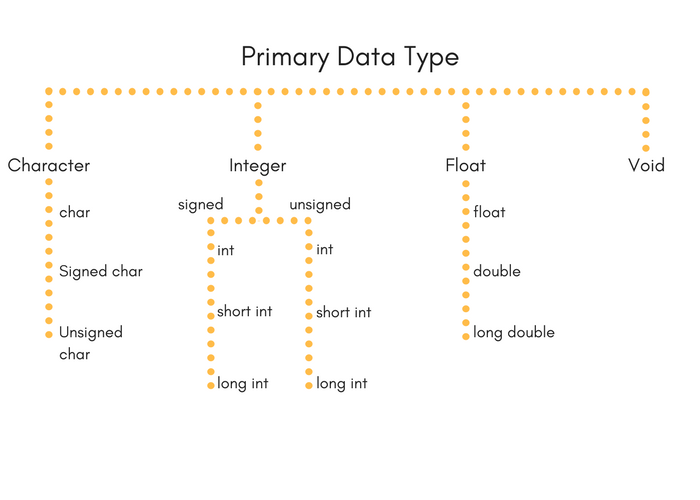
Integer type
Integers are used to store whole numbers.
Size and range of Integer type on 16-bit machine:
| Type | Size(bytes) | Range |
|---|---|---|
| int or signed int | 2 | -32,768 to 32767 |
| unsigned int | 2 | 0 to 65535 |
| short int or signed short int | 1 | -128 to 127 |
| unsigned short int | 1 | 0 to 255 |
| long int or signed long int | 4 | -2,147,483,648 to 2,147,483,647 |
| unsigned long int | 4 | 0 to 4,294,967,295 |
Floating point type
Floating types are used to store real numbers.
Size and range of Integer type on 16-bit machine
| Type | Size(bytes) | Range |
|---|---|---|
| Float | 4 | 3.4E-38 to 3.4E+38 |
| double | 8 | 1.7E-308 to 1.7E+308 |
| long double | 10 | 3.4E-4932 to 1.1E+4932 |
Character type
Character types are used to store characters value.
Size and range of Integer type on 16-bit machine
| Type | Size(bytes) | Range |
|---|---|---|
| char or signed char | 1 | -128 to 127 |
| unsigned char | 1 | 0 to 255 |
void type
void type means no value. This is usually used to specify the type of functions which returns nothing. We will get acquainted to this datatype as we start learning more advanced topics in C language, like functions, pointers etc.
C Input and Output
Input means to provide the program with some data to be used in the program and Output means to display data on screen or write the data to a printer or a file.
C programming language provides many built-in functions to read any given input and to display data on screen when there is a need to output the result.
In this tutorial, we will learn about such functions, which can be used in our program to take input from user and to output the result on screen.
All these built-in functions are present in C header files, we will also specify the name of header files in which a particular function is defined while discussing about it.
scanf() and printf() functions
The standard input-output header file, named stdio.h contains the definition of the functions printf() and scanf(), which are used to display output on screen and to take input from user respectively.
#include<stdio.h>

void main()
{
    // defining a variable
    int i;
    /*
        displaying message on the screen
        asking the user to input a value
    */
    printf("Please enter a value...");
    /*
        reading the value entered by the user
    */
    scanf("%d", &i);
    /*
        displaying the number as output
    */
    printf( "\nYou entered: %d", i);
}
When you will compile the above code, it will ask you to enter a value. When you will enter the value, it will display the value you have entered on screen.
You must be wondering what is the purpose of %d inside the scanf() or printf() functions. It is known as format string and this informs the scanf() function, what type of input to expect and in printf() it is used to give a heads up to the compiler, what type of output to expect.
| Format String | Meaning |
|---|---|
%d | Scan or print an integer as signed decimal number |
%f | Scan or print a floating point number |
%c | To scan or print a character |
%s | To scan or print a character string. The scanning ends at whitespace. |
We can also limit the number of digits or characters that can be input or output, by adding a number with the format string specifier, like "%1d" or "%3s", the first one means a single numeric digit and the second one means 3 characters, hence if you try to input 42, while scanf() has "%1d", it will take only 4 as input. Same is the case for output.
In C Language, computer monitor, printer etc output devices are treated as files and the same process is followed to write output to these devices as would have been followed to write the output to a file.
NOTE : printf() function returns the number of characters printed by it, and scanf() returns the number of characters read by it.
int i = printf("studytonight");
In this program printf("studytonight"); will return 12 as result, which will be stored in the variable i,
C Language Basic Syntax Rules
C language syntax specify rules for sequence of characters to be written in C language. In simple language it states how to form statements in a C language program – How should the line of code start, how it should end, where to use double quotes, where to use curly brackets etc.
The rule specify how the character sequence will be grouped together, to form tokens. A smallest individual unit in C program is known as C Token. Tokens are either keywords, identifiers, constants, variables or any symbol which has some meaning in C language. A C program can also be called as a collection of various tokens.
In the following program,
#include
int main()
{
    printf("Hello,World");
    return 0;
}
if we take any one statement:
printf("Hello,World");
Then the tokens in this statement are→ printf, (, "Hello,World", ) and ;.
So C tokens are basically the building blocks of a C program.
Semicolon ;
Semicolon ; is used to mark the end of a statement and beginning of another statement. Absence of semicolon at the end of any statement, will mislead the compiler to think that this statement is not yet finished and it will add the next consecutive statement after it, which may lead to compilation(syntax) error.
#include
int main()
{
    printf("Hello,World")
    return 0;
}
In the above program, we have omitted the semicolon from the printf("...") statement, hence the compiler will think that starting from printf uptill the semicolon after return 0 statement, is a single statement and this will lead to compilation error.
Comments
Comments are plain simple text in a C program that are not compiled by the compiler. We write comments for better understanding of the program. Though writing comments is not compulsory, but it is recommended to make your program more descriptive. It make the code more readable.
There are two ways in which we can write comments.
- Using
//This is used to write a single line comment. - Using
/* */: The statements enclosed within/*and*/, are used to write multi-line comments.
Example of comments :
// This is a comment

/* This is a comment */

/* This is a long
and valid comment */

// this is not
  a valid comment
Some basic syntax rule for C program
- C is a case sensitive language so all C instructions must be written in lower case letter.
- All C statement must end with a semicolon.
- Whitespace is used in C to describe blanks and tabs.
- Whitespace is required between keywords and identifiers. We will learn about keywords and identifiers in the next tutorial.
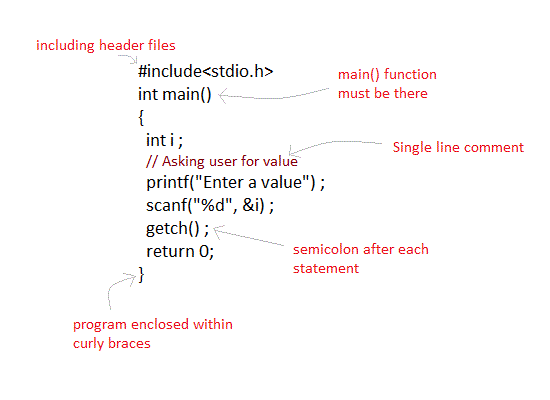
First C Program and its Structure
Lets see how to write a simple and most basic C program:
#include <stdio.h>
int main()
{
 printf("Hello,World");  //single line comment
 return 0;
/*
    multi
    line
    comments
/*
}
Hello,World
Different parts of C program
- Pre-processor
- Header file
- Function
- Variables
- Statements & expressions
- Comments
All these are essential parts of a C language program.
Pre-processor
#include is the first word of any C program. It is also known as a pre-processor. The task of a pre-processor is to initialize the environment of the program, i.e to link the program with the header files required.
So, when we say #include <stdio.h>, it is to inform the compiler to include the stdio.h header file to the program before executing it.
Header file
A Header file is a collection of built-in(readymade) functions, which we can directly use in our program. Header files contain definitions of the functions which can be incorporated into any C program by using pre-processor #include statement with the header file. For example, to use the printf() function in a program, which is used to display anything on the screen, the line #include <stdio.h> is required because the header file stdio.h contains the printf() function. All header files will have an extension .h
main() function
main() function is a function that must be there in every C program. Everything inside this function in a C program will be executed. In the above example, int written before the main() function is the return type of main() function. we will discuss about it in detail later. The curly braces { } just after the main() function encloses the body of main() function.
Comments
We can add comments in our program to describe what we are doing in the program. These comments are ignored by the compiler and are not executed.
To add a single line comment, start it by adding two forward slashses // followed by the comment.To add multiline comment, enclosed it between /* .... */, just like in the program above.
Return statement – return 0;
All the C programs can be written and edited in normal text editors like Notepad or Notepad++ and must be saved with a file name with extension as .cIf you do not add the extension .c then the compiler will not recognise it as a C language program file.A return statement is just meant to define the end of any C program.
Decision making in C
Decision making is about deciding the order of execution of statements based on certain conditions or repeat a group of statements until certain specified conditions are met. C language handles decision-making by supporting the following statements,
ifstatementswitchstatement- conditional operator statement (
? :operator) gotostatement
Decision making with if statement
The if statement may be implemented in different forms depending on the complexity of conditions to be tested. The different forms are,
- Simple
ifstatement if....elsestatement- Nested
if....elsestatement - Using
else ifstatement
Simple if statement
The general form of a simple if statement is,
if(expression)
{
    statement inside;
}
    statement outside;
If the expression returns true, then the statement-inside will be executed, otherwise statement-inside is skipped and only the statement-outside is executed.
if...else statement
The general form of a simple if...else statement is,
if(expression)
{
    statement block1;
}
else
{
    statement block2;
}
If the expression is true, the statement-block1 is executed, else statement-block1 is skipped and statement-block2 is executed.
Nested if....else statement
The general form of a nested if...else statement is,
if( expression )
{
    if( expression1 )
    {
        statement block1;
    }
    else
    {
        statement block2;
    }
}
else
{
    statement block3;
}
if expression is false then statement-block3 will be executed, otherwise the execution continues and enters inside the first if to perform the check for the next if block, where if expression 1 is true the statement-block1 is executed otherwise statement-block2 is executed.
else if ladder
The general form of else-if ladder is,
if(expression1)
{
    statement block1;
}
else if(expression2)
{
    statement block2;
}
else if(expression3 )
{
    statement block3;
}
else
    default statement;
The expression is tested from the top(of the ladder) downwards. As soon as a true condition is found, the statement associated with it is executed.
Switch statement in C
When you want to solve multiple option type problems, for example: Menu like program, where one value is associated with each option and you need to choose only one at a time, then, switch statement is used.
Switch statement is a control statement that allows us to choose only one choice among the many given choices. The expression in switch evaluates to return an integral value, which is then compared to the values present in different cases. It executes that block of code which matches the case value. If there is no match, then default block is executed(if present). The general form of switch statement is,
switch(expression)
{Difference between switch and if
if statements can evaluate float conditions. switch statements cannot evaluate float conditions.
if statement can evaluate relational operators. switch statement cannot evaluate relational operators i.e they are not allowed in switch statement.
    case value-1:
    	block-1;
    	break;
    case value-2:
    	block-2;
    	break;
    case value-3:
    	block-3;
    	break;
    case value-4:
    	block-4;
   	    break;
    default:
   	    default-block;
    	break;
}
Rules for using switch statement
- The expression (after switch keyword) must yield an integer value i.e the expression should be an integer or a variable or an expression that evaluates to an integer.
- The case label values must be unique.
- The case label must end with a colon(:)
- The next line, after the case statement, can be any valid C statement.
Difference between switch and if
ifstatements can evaluatefloatconditions.switchstatements cannot evaluatefloatconditions.ifstatement can evaluate relational operators.switchstatement cannot evaluate relational operators i.e they are not allowed inswitchstatement .
How to use Loops in C
In any programming language including C, loops are used to execute a set of statements repeatedly until a particular condition is satisfied.
How it Works
The below diagram depicts a loop execution,
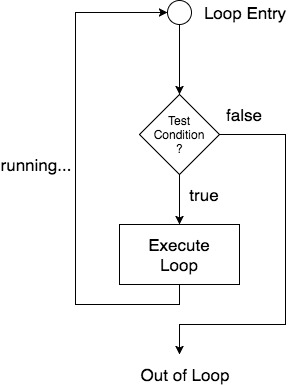
As per the above diagram, if the Test Condition is true, then the loop is executed, and if it is false then the execution breaks out of the loop. After the loop is successfully executed the execution again starts from the Loop entry and again checks for the Test condition, and this keeps on repeating.
The sequence of statements to be executed is kept inside the curly braces { } known as the Loop body. After every execution of the loop body, condition is verified, and if it is found to be true the loop body is executed again. When the condition check returns false, the loop body is not executed, and execution breaks out of the loop.
Types of Loop
There are 3 types of Loop in C language, namely:
whileloopforloopdo whileloop
while loop
while loop can be addressed as an entry control loop. It is completed in 3 steps.
- Variable initialization.(e.g
int x = 0;) - condition(e.g
while(x <= 10)) - Variable increment or decrement (
x++orx--orx = x + 2)
Syntax :
variable initialization;
while(condition)
{
    statements;
    variable increment or decrement;
}
for loop
for loop is used to execute a set of statements repeatedly until a particular condition is satisfied. We can say it is an open ended loop.. General format is,
for(initialization; condition; increment/decrement)
{
    statement-block;
}
In for loop we have exactly two semicolons, one after initialization and second after the condition. In this loop we can have more than one initialization or increment/decrement, separated using comma operator. But it can have only one condition.
The for loop is executed as follows:
- It first evaluates the initialization code.
- Then it checks the condition expression.
- If it is true, it executes the for-loop body.
- Then it evaluate the increment/decrement condition and again follows from step 2.
- When the condition expression becomes false, it exits the loop.
Nested for loop
We can also have nested for loops, i.e one for loop inside another for loop. Basic syntax is,
for(initialization; condition; increment/decrement)
{
    for(initialization; condition; increment/decrement)
    {
        statement ;
    }
}
do while loop
In some situations it is necessary to execute body of the loop before testing the condition. Such situations can be handled with the help of do-while loop. do statement evaluates the body of the loop first and at the end, the condition is checked using while statement. It means that the body of the loop will be executed at least once, even though the starting condition inside while is initialized to be false. General syntax is,
do
{
    .....
    .....
}
while(condition)
Jumping Out of Loops
Sometimes, while executing a loop, it becomes necessary to skip a part of the loop or to leave the loop as soon as certain condition becomes true. This is known as jumping out of loop.
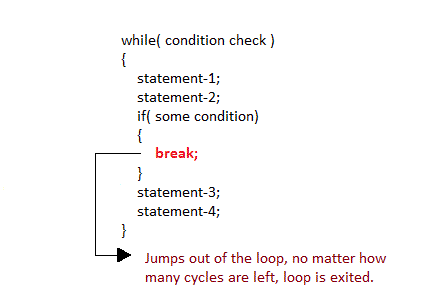
1) break statement
When break statement is encountered inside a loop, the loop is immediately exited and the program continues with the statement immediately following the loop.
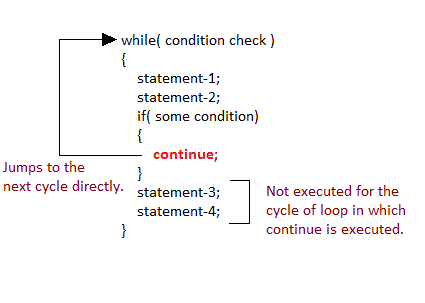
2) continue statement
It causes the control to go directly to the test-condition and then continue the loop process. On encountering continue, cursor leave the current cycle of loop, and starts with the next cycle.
array in c
In C language, arrays are reffered to as structured data types. An array is defined as finite ordered collection of homogenous data, stored in contiguous memory locations.
Here the words,
- finite means data range must be defined.
- ordered means data must be stored in continuous memory addresses.
- homogenous means data must be of similar data type.
Example where arrays are used,
- to store list of Employee or Student names,
- to store marks of students,
- or to store list of numbers or characters etc.
Since arrays provide an easy way to represent data, it is classified amongst the data structures in C. Other data structures in c are structure, lists, queues, trees etc. Array can be used to represent not only simple list of data but also table of data in two or three dimensions.
Declaring an Array
Like any other variable, arrays must be declared before they are used. General form of array declaration is,
data-type variable-name[size];

/* Example of array declaration */

int arr[10];

Here int is the data type, arr is the name of the array and 10 is the size of array. It means array arr can only contain 10 elements of int type.
Index of an array starts from 0 to size-1 i.e first element of arr array will be stored at arr[0] address and the last element will occupy arr[9].
Initialization of an Array
After an array is declared it must be initialized. Otherwise, it will contain garbage value(any random value). An array can be initialized at either compile time or at runtime.
Compile time Array initialization
Compile time initialization of array elements is same as ordinary variable initialization. The general form of initialization of array is,
data-type array-name[size] = { list of values };

/* Here are a few examples */
int marks[4]={ 67, 87, 56, 77 };    // integer array initialization

float area[5]={ 23.4, 6.8, 5.5 };   // float array initialization

int marks[4]={ 67, 87, 56, 77, 59 };    // Compile time error
One important thing to remember is that when you will give more initializer(array elements) than the declared array size than the compiler will give an error.
#include<stdio.h>

void main()
{
    int i;
    int arr[] = {2, 3, 4};      // Compile time array initialization
    for(i = 0 ; i < 3 ; i++)
    {
        printf("%d\t",arr[i]);
    }
}
2 3 4
Runtime Array initialization
An array can also be initialized at runtime using scanf() function. This approach is usually used for initializing large arrays, or to initialize arrays with user specified values. Example,
#include<stdio.h>

void main()
{
    int arr[4];
    int i, j;
    printf("Enter array element");
    for(i = 0; i < 4; i++)
    {
        scanf("%d", &arr[i]);    //Run time array initialization
    }
    for(j = 0; j < 4; j++)
    {
        printf("%d\n", arr[j]);
    }
}
Two dimensional Arrays
C language supports multidimensional arrays also. The simplest form of a multidimensional array is the two-dimensional array. Both the row’s and column’s index begins from 0.
Two-dimensional arrays are declared as follows,
data-type array-name[row-size][column-size]

/* Example */
int a[3][4];

An array can also be declared and initialized together. For example,
int arr[][3] = {
    {0,0,0},
    {1,1,1}
};
Note: We have not assigned any row value to our array in the above example. It means we can initialize any number of rows. But, we must always specify number of columns, else it will give a compile time error. Here, a 2*3 multi-dimensional matrix is created.
Runtime initialization of a two dimensional Array
#include<stdio.h>

void main()
{
    int arr[3][4];
    int i, j, k;
    printf("Enter array element");
    for(i = 0; i < 3;i++)
    {
        for(j = 0; j < 4; j++)
        {
            scanf("%d", &arr[i][j]);
        }
    }
    for(i = 0; i < 3; i++)
    {
        for(j = 0; j < 4; j++)
        {
            printf("%d", arr[i][j]);
        }
    }
}
String and Character Array
String is a sequence of characters that is treated as a single data item and terminated by null character '\0'. Remember that C language does not support strings as a data type. A string is actually one-dimensional array of characters in C language. These are often used to create meaningful and readable programs.
For example: The string “hello world” contains 12 characters including '\0' character which is automatically added by the compiler at the end of the string.
Declaring and Initializing a string variables
There are different ways to initialize a character array variable.
char name[13] = "StudyTonight";       // valid character array initialization

char name[10] = {'L','e','s','s','o','n','s','\0'};     // valid initialization
Remember that when you initialize a character array by listing all of its characters separately then you must supply the '\0' character explicitly.
Some examples of illegal initialization of character array are,
char ch[3] = "hell";    // Illegal

char str[4];
str = "hell";   // Illegal
String Input and Output
Input function scanf() can be used with %s format specifier to read a string input from the terminal. But there is one problem with scanf() function, it terminates its input on the first white space it encounters. Therefore if you try to read an input string “Hello World” using scanf() function, it will only read Hello and terminate after encountering white spaces.
However, C supports a format specification known as the edit set conversion code %[..] that can be used to read a line containing a variety of characters, including white spaces.
String Handling Functions
C language supports a large number of string handling functions that can be used to carry out many of the string manipulations. These functions are packaged in string.h library. Hence, you must include string.h header file in your programs to use these functions.
The following are the most commonly used string handling functions.
| Method | Description |
|---|---|
strcat() | It is used to concatenate(combine) two strings |
strlen() | It is used to show length of a string |
strrev() | It is used to show reverse of a string |
strcpy() | Copies one string into another |
strcmp() | It is used to compare two string |
strcat() function
strcat("hello", "world");
strcat() function will add the string “world” to “hello” i.e it will ouput helloworld.
strlen() function
strlen() function will return the length of the string passed to it.
int j;
j = strlen("studytonight");
printf("%d",j);
12
strcmp() function
strcmp() function will return the ASCII difference between first unmatching character of two strings.
int j;
j = strcmp("study", "tonight");
printf("%d",j);
-1
strcpy() function
It copies the second string argument to the first string argument.
#include<stdio.h>
#include<string.h>

int main()
{
    char s1[50];
    char s2[50];

    strcpy(s1, "StudyTonight");     //copies "studytonight" to string s1
    strcpy(s2, s1);     //copies string s1 to string s2

    printf("%s\n", s2);

    return(0);
}
strrev() function
It is used to reverse the given string expression
Functions in C
A function is a block of code that performs a particular task.
There are many situations where we might need to write same line of code for more than once in a program. This may lead to unnecessary repetition of code, bugs and even becomes boring for the programmer. So, C language provides an approach in which you can declare and define a group of statements once in the form of a function and it can be called and used whenever required.
These functions defined by the user are also know as User-defined Functions
C functions can be classified into two categories,
- Library functions
- User-defined functions
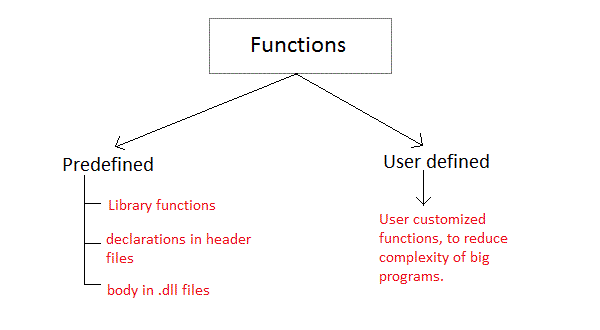
Library functions are those functions which are already defined in C library, example printf(), scanf(), strcat() etc. You just need to include appropriate header files to use these functions. These are already declared and defined in C libraries.
A User-defined functions on the other hand, are those functions which are defined by the user at the time of writing program. These functions are made for code reusability and for saving time and space.
Benefits of Using Functions
- It provides modularity to your program’s structure.
- It makes your code reusable. You just have to call the function by its name to use it, wherever required.
- In case of large programs with thousands of code lines, debugging and editing becomes easier if you use functions.
- It makes the program more readable and easy to understand.
Function Declaration
General syntax for function declaration is,
returntype functionName(type1 parameter1, type2 parameter2,...);
Like any variable or an array, a function must also be declared before its used. Function declaration informs the compiler about the function name, parameters is accept, and its return type. The actual body of the function can be defined separately. It’s also called as Function Prototyping. Function declaration consists of 4 parts.
- returntype
- function name
- parameter list
- terminating semicolon
returntype
When a function is declared to perform some sort of calculation or any operation and is expected to provide with some result at the end, in such cases, a return statement is added at the end of function body. Return type specifies the type of value(int, float, char, double) that function is expected to return to the program which called the function.
Note: In case your function doesn’t return any value, the return type would be void.
functionName
Function name is an identifier and it specifies the name of the function. The function name is any valid C identifier and therefore must follow the same naming rules like other variables in C language.
parameter list
The parameter list declares the type and number of arguments that the function expects when it is called. Also, the parameters in the parameter list receives the argument values when the function is called . They are often referred as formal parameters .
Function definition Syntax
Just like in the example above, the general syntax of function definition is,
returntype functionName(type1 parameter1, type2 parameter2,...)
{
    // function body goes here
}
The first line returntype functionName(type1 parameter1, type2 parameter2,…) is known as function header and the statement(s) within curly braces is called function body.
Note: While defining a function, there is no semicolon(;) after the parenthesis in the function header, unlike while declaring the function or calling the function.
functionbody
The function body contains the declarations and the statements(algorithm) necessary for performing the required task. The body is enclosed within curly braces { ... } and consists of three parts.
- local variable declaration(if required).
- function statements to perform the task inside the function.
- a return statement to return the result evaluated by the function(if return type is
void, then no return statement is required).
Calling a function
When a function is called, control of the program gets transferred to the function.
functionName(argument1, argument2,...);
In the example above, the statement multiply(i, j); inside the main() function is function call.
Passing Arguments to a function
Arguments are the values specified during the function call, for which the formal parameters are declared while defining the function.
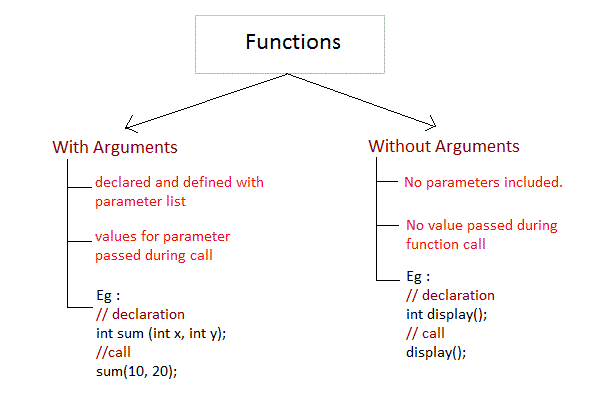
It is possible to have a function with parameters but no return type. It is not necessary, that if a function accepts parameter(s), it must return a result too.
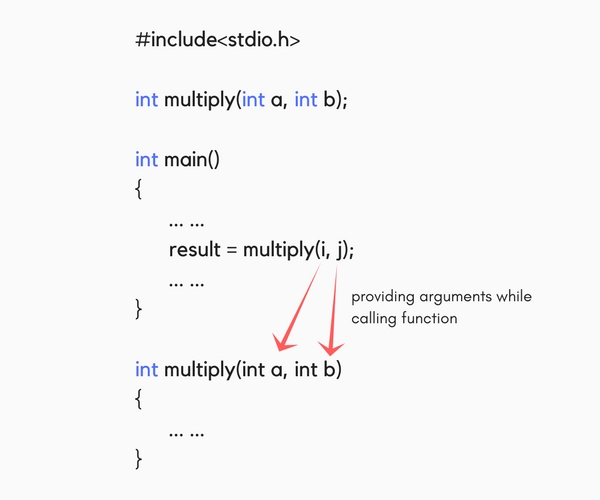
While declaring the function, we have declared two parameters a and b of type int. Therefore, while calling that function, we need to pass two arguments, else we will get compilation error. And the two arguments passed should be received in the function definition, which means that the function header in the function definition should have the two parameters to hold the argument values. These received arguments are also known as formal parameters. The name of the variables while declaring, calling and defining a function can be different.
Type of User-defined Functions in C
There can be 4 different types of user-defined functions, they are:
- Function with no arguments and no return value
- Function with no arguments and a return value
- Function with arguments and no return value
- Function with arguments and a return value
Below, we will discuss about all these types, along with program examples.
Function with no arguments and no return value
Such functions can either be used to display information or they are completely dependent on user inputs.
Below is an example of a function, which takes 2 numbers as input from user, and display which is the greater number.
#include<stdio.h>

void greatNum();       // function declaration

int main()
{
    greatNum();        // function call
    return 0;
}

void greatNum()        // function definition
{
    int i, j;
    printf("Enter 2 numbers that you want to compare...");
    scanf("%d%d", &i, &j);
    if(i > j) {
        printf("The greater number is: %d", i);
    }
    else {
        printf("The greater number is: %d", j);
    }
}
Function with no arguments and a return value
We have modified the above example to make the function greatNum() return the number which is greater amongst the 2 input numbers.
#include<stdio.h>

int greatNum();       // function declaration

int main()
{
    int result;
    result = greatNum();        // function call
    printf("The greater number is: %d", result);
    return 0;
}

int greatNum()        // function definition
{
    int i, j, greaterNum;
    printf("Enter 2 numbers that you want to compare...");
    scanf("%d%d", &i, &j);
    if(i > j) {
        greaterNum = i;
    }
    else {
        greaterNum = j;
    }
    // returning the result
    return greaterNum;
}
Function with arguments and no return value
We are using the same function as example again and again, to demonstrate that to solve a problem there can be many different ways.
This time, we have modified the above example to make the function greatNum() take two int values as arguments, but it will not be returning anything.
#include<stdio.h>

void greatNum(int a, int b);       // function declaration

int main()
{
    int i, j;
    printf("Enter 2 numbers that you want to compare...");
    scanf("%d%d", &i, &j);
    greatNum(i, j);        // function call
    return 0;
}

void greatNum(int x, int y)        // function definition
{
    if(x > y) {
        printf("The greater number is: %d", x);
    }
    else {
        printf("The greater number is: %d", y);
    }
}
Function with arguments and a return value
This is the best type, as this makes the function completely independent of inputs and outputs, and only the logic is defined inside the function body.
#include<stdio.h>

int greatNum(int a, int b);       // function declaration

int main()
{
    int i, j, result;
    printf("Enter 2 numbers that you want to compare...");
    scanf("%d%d", &i, &j);
    result = greatNum(i, j); // function call
    printf("The greater number is: %d", result);
    return 0;
}

int greatNum(int x, int y)        // function definition
{
    if(x > y) {
        return x;
    }
    else {
        return y;
    }
}
Nesting of Functions
C language also allows nesting of functions i.e to use/call one function inside another function’s body. We must be careful while using nested functions, because it may lead to infinite nesting.
function1()
{
    // function1 body here

    function2();

    // function1 body here
}
If function2() also has a call for function1() inside it, then in that case, it will lead to an infinite nesting. They will keep calling each other and the program will never terminate.
Not able to understand? Lets consider that inside the main() function, function1() is called and its execution starts, then inside function1(), we have a call for function2(), so the control of program will go to the function2(). But as function2() also has a call to function1() in its body, it will call function1(), which will again call function2(), and this will go on for infinite times, until you forcefully exit from program execution.
What is Recursion?
Recursion is a special way of nesting functions, where a function calls itself inside it. We must have certain conditions in the function to break out of the recursion, otherwise recursion will occur infinite times.
function1()
{
    // function1 body
    function1();
    // function1 body
}
Example: Factorial of a number using Recursion
#include<stdio.h>

int factorial(int x);       //declaring the function

void main()
{
    int a, b;

    printf("Enter a number...");
    scanf("%d", &a);
    b = factorial(a);       //calling the function named factorial
    printf("%d", b);
}

int factorial(int x) //defining the function
{
    int r = 1;
    if(x == 1)
        return 1;
    else
        r = x*factorial(x-1);       //recursion, since the function calls itself

    return r;
}
Similarly, there are many more applications of recursion in C language. Go to the programs section, to find out more programs using recursion.
A function may or may not return a result. But if it does, we must use the return statement to output the result. return statement also ends the function execution, hence it must be the last statement of any function. If you write any statement after the return statement, it won’t be executed.
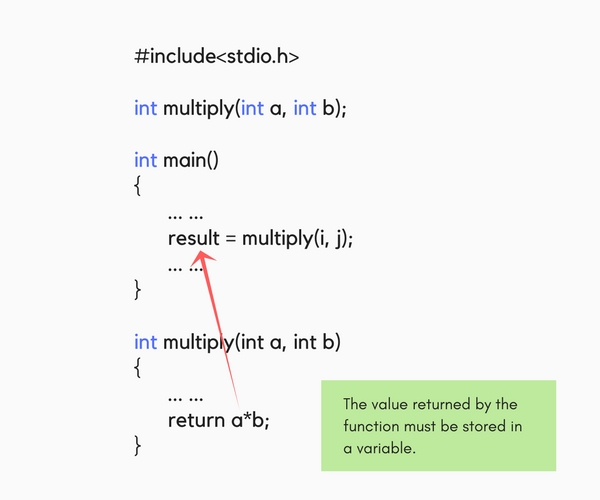
The datatype of the value returned using the return statement should be same as the return type mentioned at function declaration and definition. If any of it mismatches, you will get compilation error.
Types of Function calls in C
Functions are called by their names, we all know that, then what is this tutorial for? Well if the function does not have any arguments, then to call a function you can directly use its name. But for functions with arguments, we can call a function in two different ways, based on how we specify the arguments, and these two ways are:
- Call by Value
- Call by Reference
Call by Value
Calling a function by value means, we pass the values of the arguments which are stored or copied into the formal parameters of the function. Hence, the original values are unchanged only the parameters inside the function changes.
#include<stdio.h>

void calc(int x);

int main()
{
    int x = 10;
    calc(x);
    // this will print the value of 'x'
    printf("\nvalue of x in main is %d", x);
    return 0;
}

void calc(int x)
{
    // changing the value of 'x'
    x = x + 10 ;
    printf("value of x in calc function is %d ", x);
}
value of x in calc function is 20 value of x in main is 10
In this case, the actual variable x is not changed. This is because we are passing the argument by value, hence a copy of x is passed to the function, which is updated during function execution, and that copied value in the function is destroyed when the function ends(goes out of scope). So the variable x inside the main() function is never changed and hence, still holds a value of 10.
But we can change this program to let the function modify the original x variable, by making the function calc() return a value, and storing that value in x.
#include<stdio.h>

int calc(int x);

int main()
{
    int x = 10;
    x = calc(x);
    printf("value of x is %d", x);
    return 0;
}

int calc(int x)
{
    x = x + 10 ;
    return x;
}
value of x is 20
Call by Reference
In call by reference we pass the address(reference) of a variable as argument to any function. When we pass the address of any variable as argument, then the function will have access to our variable, as it now knows where it is stored and hence can easily update its value.
In this case the formal parameter can be taken as a reference or a pointer(don’t worry about pointers, we will soon learn about them), in both the cases they will change the values of the original variable.
#include<stdio.h>

void calc(int *p);      // functin taking pointer as argument

int main()
{
    int x = 10;
    calc(&x);       // passing address of 'x' as argument
    printf("value of x is %d", x);
    return(0);
}

void calc(int *p)       //receiving the address in a reference pointer variable
{
    /*
        changing the value directly that is
        stored at the address passed
    */
    *p = *p + 10;
}
C Structures
Structure is a user-defined datatype in C language which allows us to combine data of different types together. Structure helps to construct a complex data type which is more meaningful. It is somewhat similar to an Array, but an array holds data of similar type only. But structure on the other hand, can store data of any type, which is practical more useful.
For example: If I have to write a program to store Student information, which will have Student’s name, age, branch, permanent address, father’s name etc, which included string values, integer values etc, how can I use arrays for this problem, I will require something which can hold data of different types together.
In structure, data is stored in form of records.
Declaring Structure Variables
It is possible to declare variables of a structure, either along with structure definition or after the structure is defined. Structure variable declaration is similar to the declaration of any normal variable of any other datatype. Structure variables can be declared in following two ways:
1) Declaring Structure variables separately
struct Student
{
    char name[25];
    int age;
    char branch[10];
    //F for female and M for male
    char gender;
};

struct Student S1, S2;      //declaring variables of struct Student
2) Declaring Structure variables with structure definition
struct Student
{
    char name[25];
    int age;
    char branch[10];
    //F for female and M for male
    char gender;
}S1, S2;
Here S1 and S2 are variables of structure Student. However this approach is not much recommended.
Accessing Structure Members
Structure members can be accessed and assigned values in a number of ways. Structure members have no meaning individually without the structure. In order to assign a value to any structure member, the member name must be linked with the structure variable using a dot . operator also called period or member access operator.
struct keyword is used to define a structure. struct defines a new data type which is a collection of primary and derived datatypes.
Syntax:
struct [structure_tag]
{
    //member variable 1
    //member variable 2
    //member variable 3
    ...
}[structure_variables];
As you can see in the syntax above, we start with the struct keyword, then it’s optional to provide your structure a name, we suggest you to give it a name, then inside the curly braces, we have to mention all the member variables, which are nothing but normal C language variables of different types like int, float, array etc.
After the closing curly brace, we can specify one or more structure variables, again this is optional.
Note: The closing curly brace in the structure type declaration must be followed by a semicolon(;).
Structure Initialization
Like a variable of any other datatype, structure variable can also be initialized at compile time.
struct Patient
{
    float height;
    int weight;
    int age;
};

struct Patient p1 = { 180.75 , 73, 23 };    //initialization
or,
struct Patient p1;
p1.height = 180.75;     //initialization of each member separately
p1.weight = 73;
p1.age = 23;
Array of Structure
We can also declare an array of structure variables. in which each element of the array will represent a structure variable. Example : struct employee emp[5];
The below program defines an array emp of size 5. Each element of the array emp is of type Employee.
#include<stdio.h>

struct Employee
{
    char ename[10];
    int sal;
};

struct Employee emp[5];
int i, j;
void ask()
{
    for(i = 0; i < 3; i++)
    {
        printf("\nEnter %dst Employee record:\n", i+1);
        printf("\nEmployee name:\t");
        scanf("%s", emp[i].ename);
        printf("\nEnter Salary:\t");
        scanf("%d", &emp[i].sal);
    }
    printf("\nDisplaying Employee record:\n");
    for(i = 0; i < 3; i++)
    {
        printf("\nEmployee name is %s", emp[i].ename);
        printf("\nSlary is %d", emp[i].sal);
    }
}
void main()
{
    ask();
}
Nested Structures
Nesting of structures, is also permitted in C language. Nested structures means, that one structure has another stucture as member variable.
Example:
struct Student
{
    char[30] name;
    int age;
    /* here Address is a structure */
    struct Address
    {
        char[50] locality;
        char[50] city;
        int pincode;
    }addr;
};
Structure as Function Arguments
We can pass a structure as a function argument just like we pass any other variable or an array as a function argument.
Example:
#include<stdio.h>

struct Student
{
    char name[10];
    int roll;
};

void show(struct Student st);

void main()
{
    struct Student std;
    printf("\nEnter Student record:\n");
    printf("\nStudent name:\t");
    scanf("%s", std.name);
    printf("\nEnter Student rollno.:\t");
    scanf("%d", &std.roll);
    show(std);
}

void show(struct Student st)
{
    printf("\nstudent name is %s", st.name);
    printf("\nroll is %d", st.roll);
}
C Unions
Unions are conceptually similar to structures. The syntax to declare/define a union is also similar to that of a structure. The only differences is in terms of storage. In structure each member has its own storage location, whereas all members of union uses a single shared memory location which is equal to the size of its largest data member.
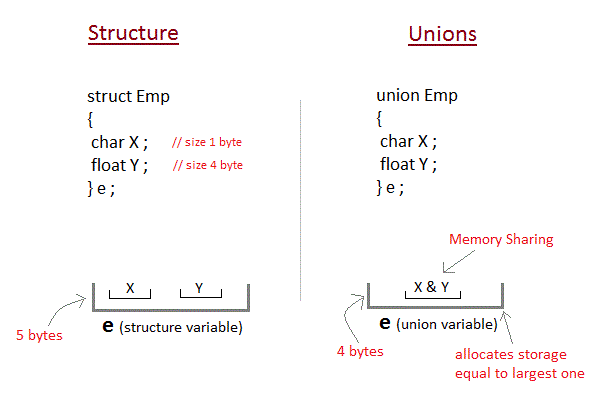
This implies that although a union may contain many members of different types, it cannot handle all the members at the same time. A union is declared using the union keyword.
union item
{
    int m;
    float x;
    char c;
}It1;
This declares a variable It1 of type union item. This union contains three members each with a different data type. However only one of them can be used at a time. This is due to the fact that only one location is allocated for all the union variables, irrespective of their size. The compiler allocates the storage that is large enough to hold the largest variable type in the union.
In the union declared above the member x requires 4 bytes which is largest amongst the members for a 16-bit machine. Other members of union will share the same memory address.
Introduction to C Pointers
A Pointer in C language is a variable which holds the address of another variable of same data type.
Pointers are used to access memory and manipulate the address.
Pointers are one of the most distinct and exciting features of C language. It provides power and flexibility to the language. Although pointers may appear a little confusing and complicated in the beginning, but trust me, once you understand the concept, you will be able to do so much more with C language.
Before we start understanding what pointers are and what they can do, let’s start by understanding what does “Address of a memory location” means?
Address in C
Whenever a variable is defined in C language, a memory location is assigned for it, in which it’s value will be stored. We can easily check this memory address, using the & symbol.
If var is the name of the variable, then &var will give it’s address.
Let’s write a small program to see memory address of any variable that we define in our program.
#include<stdio.h>

void main()
{
    int var = 7;
    printf("Value of the variable var is: %d\n", var);
    printf("Memory address of the variable var is: %x\n", &var);
}
Value of the variable var is: 7 Memory address of the variable var is: bcc7a00
You must have also seen in the function scanf(), we mention &var to take user input for any variable var.
scanf("%d", &var);
This is used to store the user inputted value to the address of the variable var.
Concept of Pointers
Whenever a variable is declared in a program, system allocates a location i.e an address to that variable in the memory, to hold the assigned value. This location has its own address number, which we just saw above.
Let us assume that system has allocated memory location 80F for a variable a.
int a = 10;
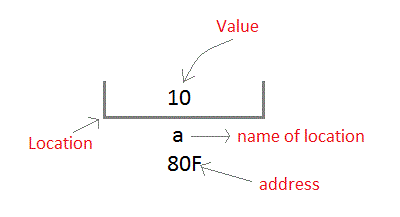
We can access the value 10 either by using the variable name a or by using its address 80F.
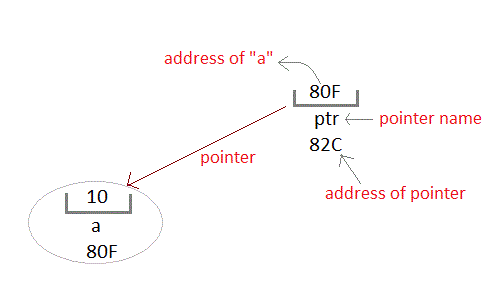
The question is how we can access a variable using it’s address? Since the memory addresses are also just numbers, they can also be assigned to some other variable. The variables which are used to hold memory addresses are called Pointer variables.
A pointer variable is therefore nothing but a variable which holds an address of some other variable. And the value of a pointer variable gets stored in another memory location.
Benefits of using pointers
Below we have listed a few benefits of using pointers:
- Pointers are more efficient in handling Arrays and Structures.
- Pointers allow references to function and thereby helps in passing of function as arguments to other functions.
- It reduces length of the program and its execution time as well.
- It allows C language to support Dynamic Memory management.
Declaring, Initializing and using a pointer variable in C
In this tutorial, we will learn how to declare, initialize and use a pointer. We will also learn what NULL pointer are and where to use them. Let’s start!
Declaration of C Pointer variable
General syntax of pointer declaration is,
datatype *pointer_name;
Data type of a pointer must be same as the data type of the variable to which the pointer variable is pointing. void type pointer works with all data types, but is not often used.
Here are a few examples:
int *ip     // pointer to integer variable
float *fp;      // pointer to float variable
double *dp;     // pointer to double variable
char *cp;       // pointer to char variable
Initialization of C Pointer variable
Pointer Initialization is the process of assigning address of a variable to a pointer variable. Pointer variable can only contain address of a variable of the same data type. In C language address operator & is used to determine the address of a variable. The & (immediately preceding a variable name) returns the address of the variable associated with it.
#include<stdio.h>

void main()
{
    int a = 10;
    int *ptr;       //pointer declaration
    ptr = &a;       //pointer initialization
}
Pointer variable always point to variables of same datatype. Let’s have an example to showcase this:
#include<stdio.h>

void main()
{
    float a;
    int *ptr;
    ptr = &a;       // ERROR, type mismatch
}
If you are not sure about which variable’s address to assign to a pointer variable while declaration, it is recommended to assign a NULL value to your pointer variable. A pointer which is assigned a NULL value is called a NULL pointer.
#include <stdio.h>

int main()
{
    int *ptr = NULL;
    return 0;
}
Using the pointer or Dereferencing of Pointer
Once a pointer has been assigned the address of a variable, to access the value of the variable, pointer is dereferenced, using the indirection operator or dereferencing operator *.
#include <stdio.h>

int main()
{
    int a, *p;  // declaring the variable and pointer
    a = 10;
    p = &a;     // initializing the pointer

    printf("%d", *p);    //this will print the value of 'a'

    printf("%d", *&a);   //this will also print the value of 'a'

    printf("%u", &a);    //this will print the address of 'a'

    printf("%u", p);     //this will also print the address of 'a'

    printf("%u", &p);    //this will print the address of 'p'

    return 0;
}
Points to remember while using pointers
- While declaring/initializing the pointer variable,
*indicates that the variable is a pointer. - The address of any variable is given by preceding the variable name with Ampersand
&. - The pointer variable stores the address of a variable. The declaration
int *adoesn’t mean thatais going to contain an integer value. It means thatais going to contain the address of a variable storing integer value. - To access the value of a certain address stored by a pointer variable,
*is used. Here, the*can be read as ‘value at’.
Time for an Example!
Let’s take a simple code example,
#include <stdio.h>

int main()
{
    int i = 10;     // normal integer variable storing value 10
    int *a;     // since '*' is used, hence its a pointer variable

    /*
        '&' returns the address of the variable 'i'
        which is stored in the pointer variable 'a'
    */
    a = &i;

    /*
        below, address of variable 'i', which is stored
        by a pointer variable 'a' is displayed
    */
   printf("Address of variable i is %u\n", a);

    /*
        below, '*a' is read as 'value at a'
        which is 10
    */
   printf("Value at the address, which is stored by pointer variable a is %d\n", *a);

   return 0;
}
Address of variable i is 2686728 (The address may vary) Value at an address, which is stored by pointer variable a is 10
Pointer and Arrays in C
When an array is declared, compiler allocates sufficient amount of memory to contain all the elements of the array. Base address i.e address of the first element of the array is also allocated by the compiler.
Suppose we declare an array arr,
int arr[5] = { 1, 2, 3, 4, 5 };
Assuming that the base address of arr is 1000 and each integer requires two bytes, the five elements will be stored as follows:

Here variable arr will give the base address, which is a constant pointer pointing to the first element of the array, arr[0]. Hence arr contains the address of arr[0] i.e 1000. In short, arr has two purpose – it is the name of the array and it acts as a pointer pointing towards the first element in the array.
arris equal to&arr[0]by default
We can also declare a pointer of type int to point to the array arr.
int *p;
p = arr;
// or,
p = &arr[0];    //both the statements are equivalent.
Now we can access every element of the array arr using p++ to move from one element to another.
NOTE: You cannot decrement a pointer once incremented. p-- won’t work.
Pointer to Array
As studied above, we can use a pointer to point to an array, and then we can use that pointer to access the array elements. Lets have an example,
#include <stdio.h>

int main()
{
    int i;
    int a[5] = {1, 2, 3, 4, 5};
    int *p = a;     // same as int*p = &a[0]
    for (i = 0; i < 5; i++)
    {
        printf("%d", *p);
        p++;
    }

    return 0;
}
In the above program, the pointer *p will print all the values stored in the array one by one. We can also use the Base address (a in above case) to act as a pointer and print all the values.

The generalized form for using pointer with an array,
*(a+i)
is same as:
a[i]
Pointer to Multidimensional Array
A multidimensional array is of form, a[i][j]. Lets see how we can make a pointer point to such an array. As we know now, name of the array gives its base address. In a[i][j], a will give the base address of this array, even a + 0 + 0 will also give the base address, that is the address of a[0][0] element.
Here is the generalized form for using pointer with multidimensional arrays.
*(*(a + i) + j)
which is same as,
a[i][j]
Pointer and Character strings
Pointer can also be used to create strings. Pointer variables of char type are treated as string.
char *str = "Hello";
The above code creates a string and stores its address in the pointer variable str. The pointer str now points to the first character of the string “Hello”. Another important thing to note here is that the string created using char pointer can be assigned a value at runtime.
char *str;
str = "hello";      //this is Legal
The content of the string can be printed using printf() and puts().
printf("%s", str);
puts(str);
Notice that str is pointer to the string, it is also name of the string. Therefore we do not need to use indirection operator *.
Array of Pointers
We can also have array of pointers. Pointers are very helpful in handling character array with rows of varying length.
char *name[3] = {
    "Adam",
    "chris",
    "Deniel"
};
//Now lets see same array without using pointer
char name[3][20] = {
    "Adam",
    "chris",
    "Deniel"
};

In the second approach memory wastage is more, hence it is prefered to use pointer in such cases.
When we say memory wastage, it doesn’t means that the strings will start occupying less space, no, characters will take the same space, but when we define array of characters, a contiguos memory space is located equal to the maximum size of the array, which is a wastage, which can be avoided if we use pointers instead.
Pointer to Array of Structures in C
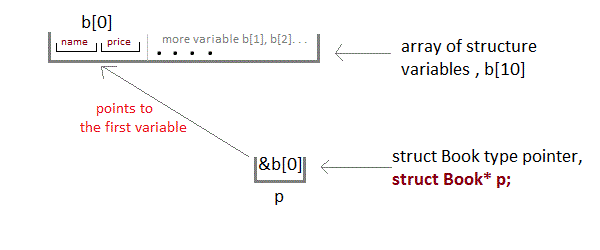
Like we have array of integers, array of pointers etc, we can also have array of structure variables. And to use the array of structure variables efficiently, we use pointers of structure type. We can also have pointer to a single structure variable, but it is mostly used when we are dealing with array of structure variables.
#include <stdio.h>

struct Book
{
    char name[10];
    int price;
}

int main()
{
    struct Book a;      //Single structure variable
    struct Book* ptr;   //Pointer of Structure type
    ptr = &a;

    struct Book b[10];  //Array of structure variables
    struct Book* p;     //Pointer of Structure type
    p = &b;

    return 0;
}
Accessing Structure Members with Pointer
To access members of structure using the structure variable, we used the dot . operator. But when we have a pointer of structure type, we use arrow -> to access structure members.
#include <stdio.h>

struct my_structure {
    char name[20];
    int number;
    int rank;
};

int main()
{
    struct my_structure variable = {"StudyTonight", 35, 1};

    struct my_structure *ptr;
    ptr = &variable;

    printf("NAME: %s\n", ptr->name);
    printf("NUMBER: %d\n", ptr->number);
    printf("RANK: %d", ptr->rank);

    return 0;
}
NAME: StudyTonight NUMBER: 35 RANK: 1
Pointer Arithmetic in C
If you want to have complete knowledge of pointers, pointer arithmetic is very important to understand. In this topic we will study how the memory addresses change when you increment a pointer.
16 bit Machine (Turbo C)
In a 16 bit machine, size of all types of pointer, be it int*, float*, char* or double* is always 2 bytes. But when we perform any arithmetic function like increment on a pointer, changes occur as per the size of their primitive data type.
Size of datatypes on 16-bit Machine:
| Type | Size (in bytes) |
|---|---|
| int or signed int | 2 |
| char | 1 |
| long | 4 |
| float | 4 |
| double | 8 |
| long double | 10 |
Examples for Pointer Arithmetic
Now lets take a few examples and understand this more clearly.
int* i;
i++;
In the above case, pointer will be of 2 bytes. And when we increment it, it will increment by 2 bytes because int is also of 2 bytes.
float* i;
i++;
In this case, size of pointer is still 2 bytes initially. But now, when we increment it, it will increment by 4 bytes because float datatype is of 4 bytes.
double* i;
i++;
Similarly, in this case, size of pointer is still 2 bytes. But now, when we increment it, it will increment by 8 bytes because its data type is double.
32 bit Machine (Visual Basic C++)
The concept of pointer arithmetic remains exact same, but the size of pointer and various datatypes is different in a 32 bit machine. Pointer in 32 bit machine is of 4 bytes.
And, following is a table for Size of datatypes on 32-bit Machine :
| Type | Size (in bytes) |
|---|---|
| int or signed int | 4 |
| char | 2 |
| long | 8 |
| float | 8 |
| double | 16 |
Note: We cannot add two pointers. This is because pointers contain addresses, adding two addresses makes no sense, because you have no idea what it would point to.But we can subtract two pointers. This is because difference between two pointers gives the number of elements of its data type that can be stored between the two pointers.
Pointers as Function Argument in C
Pointer as a function parameter is used to hold addresses of arguments passed during function call. This is also known as call by reference. When a function is called by reference any change made to the reference variable will effect the original variable.
Example Time: Swapping two numbers using Pointer
#include <stdio.h>

void swap(int *a, int *b);

int main()
{
    int m = 10, n = 20;
    printf("m = %d\n", m);
    printf("n = %d\n\n", n);

    swap(&m, &n);    //passing address of m and n to the swap function
    printf("After Swapping:\n\n");
    printf("m = %d\n", m);
    printf("n = %d", n);
    return 0;
}

/*
    pointer 'a' and 'b' holds and
    points to the address of 'm' and 'n'
*/
void swap(int *a, int *b)
{
    int temp;
    temp = *a;
    *a = *b;
    *b = temp;
}
m = 10 n = 20 After Swapping: m = 20 n = 10
Functions returning Pointer variables
A function can also return a pointer to the calling function. In this case you must be careful, because local variables of function doesn’t live outside the function. They have scope only inside the function. Hence if you return a pointer connected to a local variable, that pointer will be pointing to nothing when the function ends.
#include <stdio.h>

int* larger(int*, int*);

void main()
{
    int a = 15;
    int b = 92;
    int *p;
    p = larger(&a, &b);
    printf("%d is larger",*p);
}

int* larger(int *x, int *y)
{
    if(*x > *y)
        return x;
    else
        return y;
}
92 is larger
Safe ways to return a valid Pointer.
- Either use argument with functions. Because argument passed to the functions are declared inside the calling function, hence they will live outside the function as well.
- Or, use
staticlocal variables inside the function and return them. As static variables have a lifetime until themain()function exits, therefore they will be available througout the program.
Pointer to functions
It is possible to declare a pointer pointing to a function which can then be used as an argument in another function. A pointer to a function is declared as follows,
type (*pointer-name)(parameter);
Here is an example :
int (*sum)();   //legal declaration of pointer to function
int *sum();     //This is not a declaration of pointer to function
A function pointer can point to a specific function when it is assigned the name of that function.
int sum(int, int);
int (*s)(int, int);
s = sum;
Here s is a pointer to a function sum. Now sum can be called using function pointer s along with providing the required argument values.
s (10, 20);
Example of Pointer to Function
#include <stdio.h>

int sum(int x, int y)
{
    return x+y;
}

int main( )
{
    int (*fp)(int, int);
    fp = sum;
    int s = fp(10, 15);
    printf("Sum is %d", s);

    return 0;
}
25
A conclusion you can probably draw from how to write a program efficiently is that there are no rigid rules to follow; everything is flexible. For example, small code size of a function is not necessarily good because a recursive function, while usually taking fewer lines of code, could have an incredibly big time complexity as opposed to a non-recursive function.
 mine education